

Sub invoices that arrive complete. Every time.
Texts, PDFs, photos of napkins — every sub invoices differently, and your office burns payday chasing missing job names, weeks, and amounts.
PayHub makes every sub submit through the same required fields, so invoices arrive complete and consistent at entry.
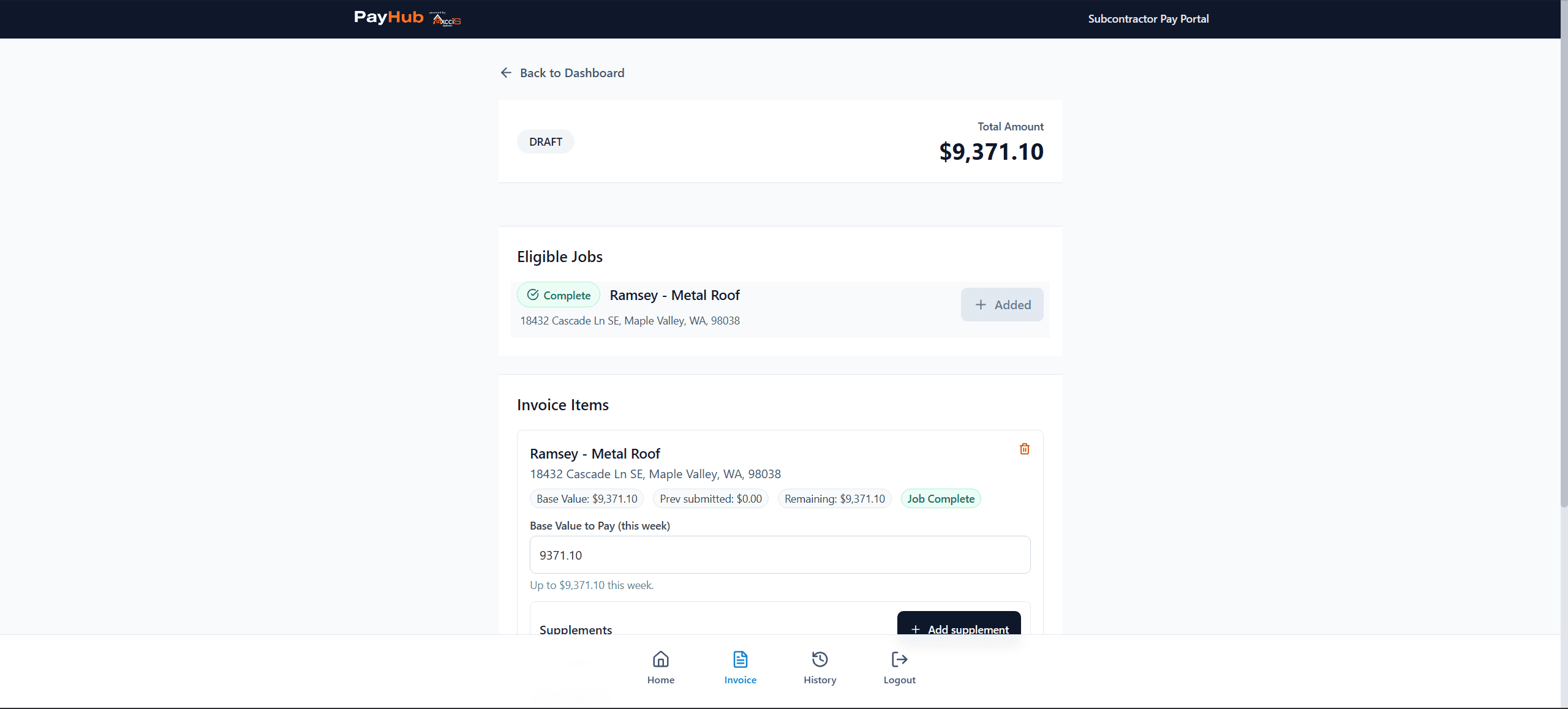
The sub portal: eligible jobs, base value, and supplements — every invoice arrives complete.
What invoice day looks like without PayHub.
- ✕Invoices come in as PDFs, texts, emails, and photos — all in different formats
- ✕Missing job numbers, vague descriptions, no line-item breakdowns
- ✕Admin spends hours following up before the invoice is even reviewable
- ✕Every sub submits differently — so every invoice takes a different amount of work
- ✕Errors and disputes trace back to bad data at submission, not bad intent
- ✓Every invoice submitted through the same required fields — no exceptions
- ✓Job number, dates, work description, and line-item amounts all required at submission
- ✓Subs can't submit incomplete invoices — the friction is at entry, not at your desk
- ✓Your office sees structured, consistent data every time, from every sub
- ✓Less follow-up, fewer errors, and no more translating what a sub meant
Structure at submission. Clarity at review.
Sub receives the form
The subcontractor gets a direct link to their submission form — no app download, no training required.
Required fields enforced
Job number, work dates, description, and line-item amounts are all required. The form won't submit without them.
Admin sees clean data
Every invoice hits the admin view in the same structured format — ready to review without a single follow-up call.
Record stays on file
Submitted invoices are timestamped, tied to the job, and stored. No more 'I sent that last week' with nothing to show for it.
Watch a sub submit: pick the job, confirm the amount, submit — it lands in your queue, structured.
Every invoice in the same format. Every week.
Instead of sorting through a week's worth of PDFs, texts, and emails, your admin sees every submission in a single structured view — same columns, same fields, same format. From every sub, every time.
- →All submissions visible in one view — no inbox digging
- →Same fields displayed for every sub, every invoice
- →Missing or incomplete data caught at submission, not at your desk
- →Timestamped records tied to the job for the full paper trail
| Crew | Job | Amount | Status |
|---|---|---|---|
| Martinez Roofing | 14 Elm St | $4,200 | Paid |
| Ridge Crew #2 | Sunset Commons | $3,850 | Approved |
| Torres & Sons | Oak Park Rd | $2,100 | Pending |
| Apex Install | Commerce Drive | $5,600 | Approved |
| Week Total | $15,750 | ||
Clean data in. Clear decisions out.
When invoices arrive structured and complete, reviewing them takes minutes — not a phone call and two emails. Approve, adjust, or reject with full context already in front of you.
- →All required data present before you ever open the invoice
- →Approve with the final amount — base plus any adjustments
- →Reject with a note so the sub knows exactly what to fix
- →Every action logged with who, when, and what amount
When the job changes, the record keeps up.
Field work changes. Material overruns happen. Extra scope gets added on-site. PayHub captures those additions inline — so they're documented at the point they occur, not reconstructed after the fact.
Add a supplement to any pay request with an amount and reason before it's approved. It rolls into the approval total automatically.
Base pay and supplement amounts are tracked separately — so you always know what the original ask was vs what was added.
Once approved, the total is locked. No retroactive edits. If something changes, a new request covers it — keeping the record clean.
See exactly what each job has cost in subcontractor pay.
The payout report groups all pay requests by job — so you can see total labor cost per job across every pay week. Useful at job close, during audits, and when tracking margins.
- →All pay weeks grouped by job name
- →Per-job subtotals and grand total
- →Filter by subcontractor, week range, or status
- →Direct link to each invoice from the report
Every pay decision is on the record — permanently.
PayHub logs every action: submission, approval, rejection, supplement, and payment. Nothing gets edited after the fact. The record stands.
Crew submits invoice. Date, time, and amounts captured immediately.
Admin approves with final amount. Who approved and when is stamped on the record.
Mark as paid with date and memo. Invoice status updates across all views.
Approved records are locked. No retroactive changes — disputes have nowhere to hide.
Built for everyone in the pay cycle.
Opens the invoice review view and sees every submission already structured, complete, and in the same format. No inbox sorting, no follow-up calls — just reviewable data ready to act on.
- ✓All submissions in one structured view
- ✓Every required field already filled — guaranteed
- ✓Act on invoices without back-and-forth
Receives clean, consistent invoice data without having to translate or reformat anything. Every submission is structured the same way — so closing the week doesn't require chasing anyone down.
- ✓Consistent data format from every sub
- ✓Filter by week, subcontractor, or job
- ✓Records with full trail from submission to payment
Gets a direct link to a simple form. Fills in the required fields — job, dates, work done, amounts — and submits. No app, no training, no guessing what the office needs.
- ✓Submit from any device in minutes
- ✓Required fields mean no rejected invoices for missing info
- ✓Confirmation and status visible after submission
PayHub Pricing
Base plan covers your parent company and includes 1 division. Additional divisions are billed separately. Monthly or annual billing.
Pricing unavailable
All pricing billed at the parent company level. View full pricing →
Stop chasing subs for invoices you can actually use.
PayHub puts the structure at submission — so every invoice that reaches your desk is already complete, consistent, and ready to review.
PayHub runs on your AccuLynx-synced jobs inside OpsHub — there is no standalone PayHub subscription.